How to Achieve Perfect Tablet Branding Without Sticking: Precision Tooling and Compression Strategies?

Struggle with tablet sticking when adding logos? Ruined batches waste money and halt production. I will show you how to fix sticking issues and keep your branding clear.

You achieve perfect tablet branding without sticking by optimizing punch designs, adjusting formulation moisture, and fine-tuning compression settings. Using shallow engravings, proper lubricants, and regular tooling maintenance ensures clear tablet logos without material buildup on the punch faces during production.

Tablet branding and sticking issues

Tablet branding and sticking issues

Stop reading now if you enjoy wasting money on ruined tablet batches. I will share the exact methods to fix your tablet tooling and powder mix today. Do not read further if you want your machines to keep jamming.

1.Why Does Embossing Increase Tablet Sticking Risks?

Adding logos causes powder to stick? This ruins the tablet surface and slows down your machines. I will explain why engravings change how powder acts under pressure.

Embossing increases sticking risks because it adds uneven surface areas to the punch. The engraved lines create more contact points, cause uneven pressure distribution, and increase ejection resistance. This forces powder to stick inside the tiny grooves instead of releasing smoothly.

Embossing sticking risks

Embossing sticking risks

I often see manufacturers struggle with sticking right after they add a new logo to their tablets. You need to understand how physical forces change when you use engraved punches. A flat punch has a simple surface.

An engraved punch has tiny walls, floors, and corners. This design increases the total contact area between the metal and the powder. More contact area means more friction.

When the tablet press applies force, the pressure does not spread evenly across an engraved punch. The raised metal parts push hard into the powder. This high pressure can make the powder melt slightly and stick to the metal.

At the same time, the deep grooves apply less pressure. The powder in these grooves stays loose and grabs onto the metal walls. When the machine pushes the tablet out, these grooves hold onto the powder.

Contact Area Comparison

Punch Type Surface Feature Sticking Risk Pressure Distribution
Flat Punch Smooth surface Low Even across the tablet
Engraved Punch Grooves and edges High Uneven, high on raised spots

You must think about these physical changes when you design your tablet branding.

2.Which Tooling Designs Cause the Most Sticking Problems?

Bad tooling ruins your tablets? Poorly designed logos trap powder and force you to stop the machine. I will show you which design mistakes you must avoid.

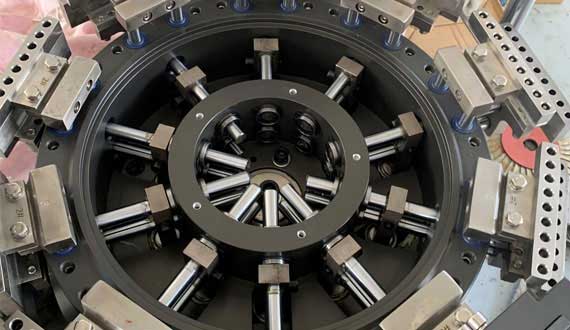
Tooling designs with deep cuts, thin lines, and sharp corners cause the most sticking problems. Complex logos trap powder inside tight spaces. Punches with poor surface polish also create rough spots where material easily grabs and builds up during high-speed compression.

Tablet press tooling designs

Tablet press tooling designs

I always tell my clients that a bad design will fail, no matter how good your powder is. You must avoid three specific design mistakes if you want to stop sticking.

First, cuts that are too deep give the powder a place to hide. You should keep engraving depths between 0.1 and 0.3 millimeters. Second, very thin lines create weak spots in the tablet. The powder breaks off and stays in the thin metal grooves. Third, complex patterns with many sharp angles act like traps for sticky materials.

You must also check the surface finish of your punches. Even a good design will stick if the metal is rough. Polishing is not just for looks. A mirror finish removes tiny scratches that act as anchor points for powder.

Design Rules for Tooling

Design Feature Bad Practice Good Practice
Cut Depth Deeper than 0.3mm 0.1mm to 0.3mm
Line Width Thin and sharp Wide and smooth
Logo Style Complex with many details Simple and bold
Surface Finish Rough with tool marks High polish, mirror finish

You can solve half of your sticking problems just by choosing a simpler, shallower logo design.

3.How Can You Adjust Formulations to Prevent Sticking?

Sticky powder ruins your production? Wet or highly binding materials cling to your punches. I will teach you how to fix your powder mix to stop sticking.

You can adjust formulations to prevent sticking by reducing the amount of binders and adding more lubricants like magnesium stearate. You must also control powder moisture levels. Keeping moisture between 3% and 8% prevents the powder from acting like glue under pressure.

Formulation adjustments

Formulation adjustments

I know that sometimes you cannot change the logo design. In these cases, you must change the powder itself. Sticking happens when the powder likes the metal punch more than it likes other powder particles.

You can change this behavior by adjusting your ingredients. First, look at your binders. Binders hold the tablet together. But too much binder makes the mixture sticky. You should reduce sticky binders. You can also switch to a different type.

different type

Next, you need to look at lubricants. Lubricants create a barrier between the powder and the metal. You can increase the amount of magnesium stearate or talc in your mix. This helps the tablet slide off the punch. Finally, you must control water. Water acts like a glue in many powders.

Formulation Adjustment Guide

Ingredient Type Action to Take Expected Result
Binders Reduce amount Lowers overall stickiness
Lubricants Increase amount Creates a better slip barrier
Moisture Content Keep between 3% and 8% Stops powder from melting into glue

You will see a huge difference when you balance these three formulation factors.

4.What Compression Process Settings Help Avoid Sticking?

Machine settings causing tablet defects? Wrong pressure and speed make sticking much worse. I will guide you on how to set your tablet press correctly.

You can avoid sticking by lowering the compression pressure and slowing down the press speed. High pressure melts the powder onto the punch, while fast speeds prevent proper tablet formation. Adjusting these settings gives the powder enough time to bind together and release smoothly.

Tablet compression settings

Tablet compression settings

I have fixed many sticking issues just by changing a few numbers on the tablet press control panel. You do not always need new tooling or new powder. Sometimes, your machine is just working too hard and too fast.

When you use very high compression force, you push the powder into every tiny scratch on the punch. This extreme force can also create heat. Heat makes binders melt and stick to the cold metal. You should try lowering your main compression force.

Speed is another big factor. When the machine runs too fast, the powder does not have time to lock together. It stays loose and grabs the punch instead. You need to slow down the turret speed. This gives the tablet more dwell time. Dwell time is the exact moment when the punch holds the powder under full pressure.

Machine Setting Adjustments

Setting Problem Condition Solution
Compression Force Too high, causes melting Lower the pressure gradually
Turret Speed Too fast, causes weak tablets Slow down to increase dwell time
Pre-compression Not used Turn on to remove trapped air

You must test these settings step by step to find the perfect balance for your specific powder.

5.How Does Equipment Maintenance Impact Tablet Branding?

Dirty machines ruining your logos? Leftover powder and scratched punches cause constant sticking. I will show you how daily maintenance keeps your tablets looking perfect.

Proper equipment maintenance prevents sticking by keeping punches clean and smooth. Regular cleaning stops old powder from building up in the logo grooves. Inspecting punches for scratches and controlling the room temperature and humidity also stops materials from melting and sticking to the metal.

Tablet compression maintenance

Tablet compression maintenance

I remind my team every day that a clean machine is a working machine. You cannot expect perfect tablets if your tools are dirty or damaged. When powder sticks to a punch, it creates a rough spot. The next tablet will stick to that exact same spot.

This problem grows quickly until the logo completely disappears. You must clean your punches regularly during long production runs. Use proper tools to remove powder from the deep logo grooves.

You also need to check your punches for physical damage. Even small scratches act like hooks that grab powder. If you find damage, you must polish or replace the punch. Environmental control is also part of maintenance. Your pressing room must stay cool and dry.

Maintenance Checklist

Maintenance Task Frequency Purpose
Punch Cleaning Every shift Removes powder buildup in grooves
Tooling Inspection Weekly Finds scratches and wear
Tooling Polishing Monthly Restores smooth surface finish
Room Climate Check Daily Keeps temp at 18-25℃, humidity low

You will save money and time if you follow a strict cleaning and inspection schedule.

Conclusion

You can stop tablet sticking by using simple logo designs, balancing your powder mix, adjusting machine speed, and keeping punches clean. These steps ensure perfect tablet branding every time. Experiencing blurry logos or chronic sticking on your production line? Click here to contact AIPAK’s technical team for a Free Tooling Design Audit and find the perfect compression balance for your next batch!

Don't forget to share this post!

Tablet Press Machine Related Posts

Tablet Press Machine Related Videos

Why you should focus on high speed rotary tablet press machine?

20 Reasons You Need To Stop Stressing About Tablet Press Machine

10 Advanced Single Punch Tablet Press Machine Techniques You Should Know

Do you know How the Military outdoor usually taken compressed bsicuit made?

How tablets made by the tablet press machine

Everything You Need to Know About rotary tablet press machine

CONTACT US

Tell us your raw material and project budget to get quotations within 24 hours.

WhatsApp Us: +86 156 0710 8630

Invalid Email
Invalid Number
Scroll to Top